
ロールまたはチームへのシングルサインオンユーザーのマップ
統合組織のグループのユーザーをチームまたはロールにマップできます。Anypoint Platform 組織は、PingFederate などの外部 ID プロバイダーを使用する必要があります。
これらをマップした後で、組織のユーザーは同じ組織のログイン情報および組織が SAML、OpenID Connect (OIDC)、LDAP を使用して維持するアクセス権限を使用して Anypoint Platform にログインできます。
これにより、ログイン情報を保護し、権限が必要な情報へのアクセスのために組織の構造を維持できます。
Anypoint Platform で求められる ID プロバイダー (IdP) の情報は、SAML、OpenID Connect、LDAP のどれを使用するかによって異なります。ユーザーのマッピングは、その対象として設定した IdP にのみ適用されます。
SAML を使用したシングルサインオン用の複数のグループマッピングの設定
組織でシングルサインオンを使用しているが、複数のグループから権限を取得する必要もある場合、個々のアクセス権限を取得する必要があるすべてのグループを含む属性を設定できます。多くの場合、グループの配列を作成できます。
たとえば、IDP が次の形式でグループを提供するとします。
<ns2:Attribute Name="Groups" NameFormat="urn:oasis:names:tc:SAML:2.0:attrname-format:unspecified">
  <ns2:AttributeValue>Mule_Org_Admin_XXX</ns2:AttributeValue>
</ns2:Attribute>
<ns2:Attribute Name="Groups" NameFormat="urn:oasis:names:tc:SAML:2.0:attrname-format:unspecified">
  <ns2:AttributeValue>Mule_Exchange_XXX</ns2:AttributeValue>
</ns2:Attribute>
セキュリティの脆弱性を回避するため、Anypoint Platform では、複数のグループマッピングを含む属性を作成する必要があります。
<ns2:Attribute Name="Groups" NameFormat="urn:oasis:names:tc:SAML:2.0:attrname-format:unspecified">
  <ns2:AttributeValue>Mule_Org_Admin_XXX</ns2:AttributeValue>
  <ns2:AttributeValue>Mule_Exchange_XXX</ns2:AttributeValue>
</ns2:Attribute>
上記の SAML アサーションの例では、[Group Attribute (グループ属性)] は Groups になります。
[Group Attribute (グループ属性)] 項目の値が、グループ名を含む SAML 属性の名前と一致していることを確認します。
OpenID Connect (OIDC) を使用したシングルサインオン用の複数のグループマッピングの設定
外部 ID プロバイダーによって、グループクレームの書式設定方法が異なります。
Anypoint Platform は、グループクレームの UserInfo 応答をチェックします。見つからない場合、Token エンドポイント応答をチェックします。
グループクレーム値を使用して、組織のユーザーの各グループのチームまたはロールを作成します。
-
外部 ID プロバイダーからのグループクレームを含む、
UserInfo または Token エンドポイントへの応答を取得します。 -
グループクレームへのアクセスを認証する追加の OIDC スコープが IdP で必要な場合、[Group Scope (グループスコープ)] 項目に入力します。
-
[Group Attribute JSONata Expression (グループ属性の JSONata 式)] の JSONata クエリで、
UserInfo または Token エンドポイント応答からグループ名の配列が生成されることを確認します。
OIDC グループ式の例
次の例は、別の外部 ID プロバイダーからのグループクレームを含む、UserInfo または Token エンドポイントからの応答を示しています。
Okta
次の例は、一般的な Okta グループクレームを示しています。
{
 ...
  "groups": [
    "Everyone",
    "groupOne"
  ]
}
グループクレームの場合、JSONata 式は groups になります。
Auth0
次の例は、一般的な Auth0 グループクレームを示しています。
{
  ...
  "https://anypoint.mulesoft.com/groups": [
    "MyGroup",
    "groupOne"
  ]
}
グループクレームの場合、JSONata 式は https://anypoint.mulesoft.com/groups になります。
LDAP を使用したシングルサインオン用の複数のグループマッピングの設定
SAML アサーションを使用して LDAP グループをチームまたはロールにマップするのに必要な情報を取得できます。LDAP を介したユーザー管理は、Anypoint Platform Private Cloud Edition でのみ使用できます。
SAML アサーションの AttributeValue から [External Group Name (外部グループ名)] への文字列の例を次に示します。
<saml:AttributeValue xmlns:xsi="http://www.w3.org/2001/XMLSchema-instance"
  xsi:type="xs:string">cn=jira-users,ou=groups,dc=muleforge,dc=org</saml:AttributeValue>
マッピング:
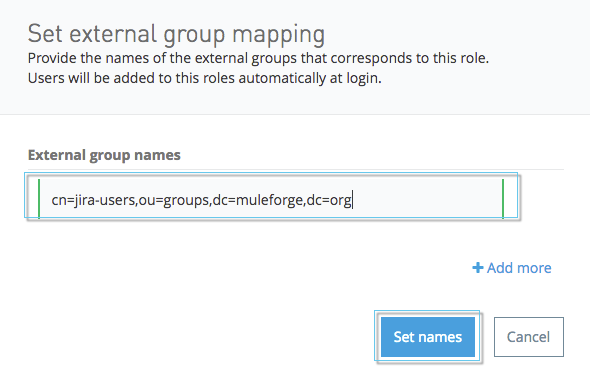
SSO ユーザーをチームにマップする
| IdP 設定を削除すると、関連付けられたチームマッピングも削除されます。 |
グループ名を含めることで、SSO ユーザーをチームにマップできます。
1 つのチームにマップする複数のグループ名がユーザーにある場合、最も多くの権限を付与するグループ名が使用されます。たとえば、Acme チームに engineering-all のメンバーグループと engineering-managers のメンテナーグループがある場合、engineering-all と engineering-managers の両方のグループ名があるユーザーがメンテナーになります。ユーザーがチームのメンテナーとして明示的に指定されており、メンバーの状況を示すグループ名がある場合、そのグループ名は無視され、ユーザーはメンテナーのままになります。
-
組織のシステム管理者権限を持つアカウントを使用して Anypoint Platform にログインします。
-
ナビゲーションバーまたは Anypoint Platform のメインページで、[Access Management (アクセス管理)] をクリックします。
-
[Access Management (アクセス管理)] ナビゲーションメニューで、[Teams (チーム)] をクリックします。
-
[Add Team (チームを追加)] をクリックします。
-
チーム名と親を指定します。
-
[Add Team (チームを追加)] をクリックします。
新しいチームが作成されます。 -
[Teams (チーム)] セクションで、新しいチームの名前をクリックします。
-
[Settings (設定)] タブをクリックします。
-
マッピングを関連付けるべき ID プロバイダーを選択します。
-
[Group Name (グループ名)] 項目で、マップするグループ名を入力します。
-
SAML: SAML グループの配列からのグループ属性
-
OIDC:
UserInfo または Token エンドポイント応答からのグループクレーム値 -
LDAP: SAML アサーションの AttributeValue からの文字列
-
-
グループ名のメンバーシップ種別を選択します。
[Maintainer (メンテナー)] を選択した場合、そのグループ名があるユーザーはこのチームのチームメンテナーになります。[Member (メンバー)] を選択した場合、このグループ名があるユーザーはチームメンバーになります。 -
[Add (追加)] をクリックします。
-
[Save Changes (変更を保存)] をクリックします。
指定したグループに関連付けられている SSO ユーザーがチームに割り当てられます。
SSO ユーザーをロールにマップする
組織の SSO ユーザーのグループにマップするロールを作成できます。
-
組織のシステム管理者権限を持つアカウントを使用して Anypoint Platform にログインします。
-
ナビゲーションバーまたは Anypoint Platform のメインページで、[Access Management (アクセス管理)] をクリックします。
-
[Access Management (アクセス管理)] ナビゲーションメニューで、[Business Groups (ビジネスグループ)] をクリックします。
-
アクセスする組織の名前をクリックします。
-
[Roles (ロール)] タブをクリックします。
-
[Add Role (ロールを追加)] をクリックします。
-
ロール名と説明を指定します。
-
[Add Role (ロールを追加)] をクリックします。
-
[Roles (ロール)] セクションで、新しいロールの名前をクリックします。
-
[Set external group mapping (外部グループマッピングを設定)] をクリックします。
-
マッピングを関連付けるべき ID プロバイダーを選択します。
-
[External group names (外部グループ名)] で、次のいずれかを入力します。
-
SAML: SAML グループの配列からのグループ属性
-
OIDC:
UserInfo または Token エンドポイント応答からのグループクレーム値 -
LDAP: SAML アサーションの AttributeValue からの文字列
-
-
[Update (更新)] をクリックします。
指定したグループに関連付けられている SSO ユーザーがロールに割り当てられます。