
Configure a Forward Proxy for Managed Omni Gateway on Runtime Fabric
If your Runtime Fabric cluster reaches the internet through a forward proxy, configure the proxy for each Managed Omni Gateway explicitly.
Managed Omni Gateway doesn’t inherit the forward proxy settings of the Kubernetes cluster or of Runtime Fabric. You can’t configure a forward proxy for Managed Omni Gateway in Anypoint Platform. Apply a Configuration resource to the gateway instead.
Forward Proxy Connections
Only HTTP connections route through the forward proxy.
The following connections route through the forward proxy:
-
Connections to Anypoint Platform
-
Outbound policy connections
-
Connections to upstream services
-
HTTP (Fluent Bit) log connections
Using the noProxy parameter, you can configure HTTP and HTTPS connections to connect directly without using the forward proxy.
Configuring a forward proxy does not alter these connections:
-
Connections to shared storage
-
Lightweight Directory Access Protocol (LDAP) connections
-
Non-HTTP log connections
Before You Begin
Before configuring a forward proxy for a Managed Omni Gateway, make sure that:
-
You have deployed a Managed Omni Gateway to Runtime Fabric. See Deploy a Managed Omni Gateway.
-
You have the gateway ID of the Managed Omni Gateway. Find the ID in Runtime Manager.
-
You have the forward proxy host and port.
-
The forward proxy allows the hosts and ports listed in Requirements and Limits for Omni Gateway for your control plane.
-
The forward proxy doesn’t inspect TLS traffic (SSL passthrough) on the endpoints that use mTLS. These endpoints include:
-
The Anypoint Platform control plane endpoints that the Runtime Fabric agent connects to. Managed Omni Gateway receives its configuration through the Runtime Fabric agent.
-
The external endpoints that Managed Omni Gateway connects to over mTLS, such as Anypoint Monitoring.
For the endpoints that require SSL passthrough, see Requirements and Limits for Omni Gateway.
-
Configure the Forward Proxy
-
Create a YAML file with a
Configurationresource that targets your Managed Omni Gateway:apiVersion: gateway.mulesoft.com/v1alpha1 kind: Configuration metadata: name: forward-proxy namespace: <omni-gateway-namespace> labels: rtf.mulesoft.com/target-id: <omni-gateway-id> spec: forwardProxy: https: address: http://<proxy-host>:<proxy-port> noProxy: - .cluster.local - .svc - .local - 127.0.0.1 - localhost - 169.254.169.254 - <api-server-host> - .<internal-domain>Replace the following values:
Value Description <omni-gateway-namespace>Namespace where the Managed Omni Gateway runs.
<omni-gateway-id>Gateway ID of the Managed Omni Gateway. The
rtf.mulesoft.com/target-idlabel applies the configuration to this gateway.<proxy-host>:<proxy-port>Host and port of the forward proxy.
<api-server-host>Host of the Kubernetes API server for your cluster.
.<internal-domain>Internal or corporate domains that resolve privately.
The
noProxylist in the example bypasses the proxy for in-cluster service DNS, the loopback address, the cloud instance-metadata endpoint, the Kubernetes API server, and internal domains. Adjust the list for your environment. ThenoProxyparameter doesn’t support CIDR blocks.For HTTP log connections, list the full domain name instead of a domain suffix. See noProxy Parameter.
-
Apply the resource:
-
Kubernetes
-
OpenShift
kubectl apply -f <file-name>.yamloc apply -f <file-name>.yaml -
Configuring Forward Proxy Parameters
apiVersion: gateway.mulesoft.com/v1alpha1
kind: Configuration
metadata:
  name: forward-proxy
spec:
  forwardProxy:
    https:
      address: http://proxy:8888
      basicAuth:
        username: <string>
        password: <string>
    noProxy:
       - fluentd
- .svc.cluster.local| Parameter | Required or Optional | Description |
|---|---|---|
|
required |
Proxy adddress. |
|
Optional |
Supplies the authentication username and password. |
|
Required when |
Authentication username |
|
Required when |
Authentication password. |
|
Optional |
Array containing domain names or IP addresses to communicate to without using the forward proxy. Each IP address must be listed in the array. The |
noProxy Parameter
Adding the noProxy parameter enables HTTP services you trust to communicate without using the forward proxy.
For example, when you enable noProxy, you can list HTTP log connections and connections to upstream services to have them connect directly to Omni Gateway.
When using the noProxy parameter in the YAML configuration file to communicate with HTTP logs, you must list the exact domain name. You cannot list the domain suffix, for example, .svc.cluster.local. You need to list full domain name, <logging-name>.svc.cluster.local, for all HTTP log connections.
The following diagram demonstrates the differences in communication using noProxy:
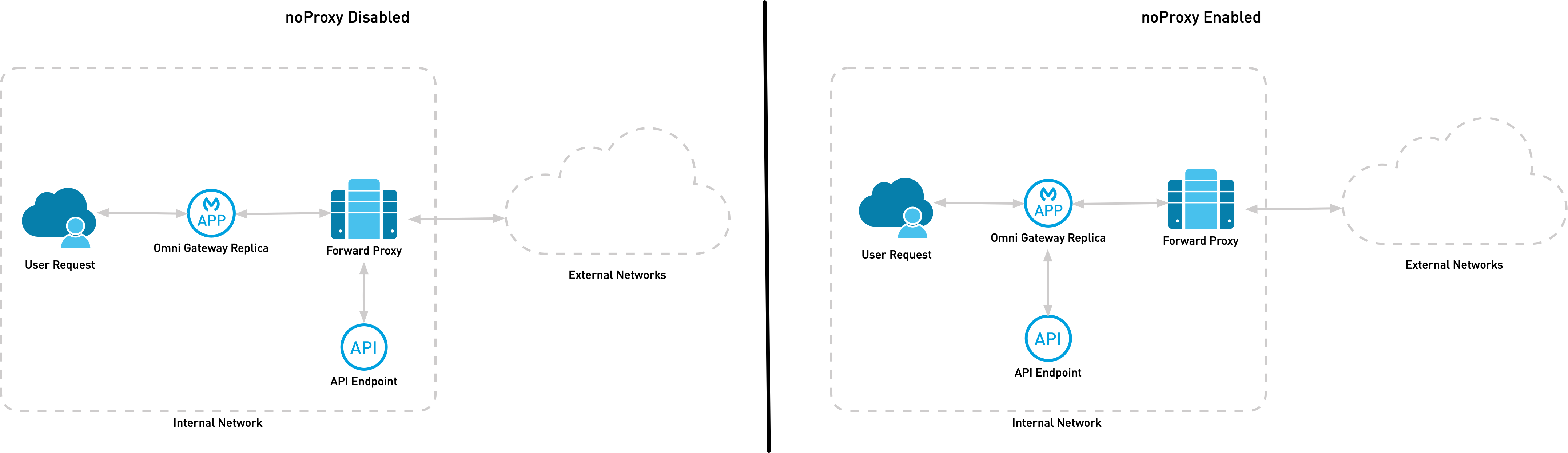
In the diagram, when you do not enable noProxy, Omni Gateway communicates with the internal API endpoint using the forward proxy. When you enable noProxy and list the API Upstream domain, Omni Gateway communicates directly with the internal API endpoint.
Verify the Forward Proxy Configuration
To confirm that the Managed Omni Gateway reaches external hosts through the forward proxy:
-
Find the egress gateway pod:
-
Kubernetes
-
OpenShift
kubectl get pods -n <omni-gateway-namespace>oc get pods -n <omni-gateway-namespace> -
-
Check the connection to an external upstream:
-
Kubernetes
-
OpenShift
kubectl exec -n <omni-gateway-namespace> <omni-egress-pod> -c app -- flexctl check http https://<upstream-host>oc exec -n <omni-gateway-namespace> <omni-egress-pod> -c app -- flexctl check http https://<upstream-host> -